Showing posts with label waterfall. Show all posts

Tuesday, June 17, 2014

A better way of handing Defects

For years I viewed defects as fights because that is usually what they turned into. And I hated it. Developers view defects as an assault on their reputation. Every defect opened is testings way of saying "you're not perfect." So developers took it personally and came into defect meetings with guns loaded. More show-stopper defects or the greater the volume of defects usually meant the bigger the developers guns became. As the "Quality Gatekeepers" of the project Testers needed to bring in just as much ammo because it was our perceived job to ensure these defects were resolved. Numerous grenades were thrown and numerous defects went into production.

Then I began working on agile projects. At first I was shocked by the lack of defects; both in the low number of defects coming out of development and the fact that none were logged. Being new to agile I decided to roll with this and see how it played out. To my amazement, it played out just like many agilistas said it would: working code was delivered faster. They were quick to point out that it took longer for me to log and manage the defect than it did for me to have a conversation with the developer and get it fixed. I actually timed this at first to check. To my amazement, it was true. And it wasn't a fluke. It happened again and again. There weren't many defects. But when there was they played out just as the agilistas expected.

The other thing that was amazing to me was how fast we were able to find the problem. This was due to the test coverage on all layers (Unit, Integration, GUI). Defects aren't about just finding a problem. Defects are about finding where the problem is. And this testing stack did a great job of layering and finding precisely where the problem was. 1 or 2 new Unit Tests, an Integration test and a GUI test later and we had working code.

With less of a need to focus on what is broken or where, I would like to propose a different approach. When a defect arises, in waterfall or agile or any other SDLC, get it fixed. But focus your questions and research more on the process which caused the defect to be created in the first place. If the root cause was a requirement miss, what can you do to prevent requirement misses in the future? Is there a coding miss? What can you (or dev) do to prevent coding misses in the future?

This approach worked wonders for me. My team was able to find that test cases were not being fully flushed out for higher risk features. By bringing the entire team to the Amigos we were able to better determine risk levels and better flush out test cases. And defects all but went away.

Focus on the why, not the what...

Thursday, June 12, 2014

Expanding the test triangle

There is a saying: Never ask a question you don't know the answer to. I'll take that a step further and say: Never ask a question you don't want to hear the answer to. So I have to chuckle internally when I am asked the question: "What do I need to test?" because no one really wants to hear my answer: "As the test engineer you are responsible for the entire stack of testing. You don't have to do the entire stack yourself. Developers can help; specialists can help; the business can help; you can do some of the testing yourself. It doesn't matter who does it. But you are responsible to make sure all layers of testing get done."

Typical response: "Wait. How do developers help with my testing? And did you say the business? I thought testing was only about making sure the requirements were built and the system still works."

Over the years I too have struggled with the question of what to test. Product Risk Analysis (PRA's) have helped me considerably to focus in on those areas of highest risk. Every discussion I have about what to test has a discussion about PRA's in it somewhere. But my real ah-ha moment came when reading Succeeding With Agile by Mike Cohn. Mike laid out the automation testing triangle; which spoke of 3 layers of tests:
  1. Automated GUI Tests
  2. Automated Integration Tests
  3. Automated Unit Tests
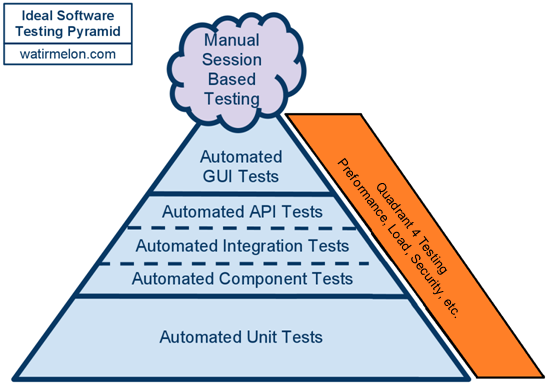
The pyramid was refined more by one of my favorite bloggers Alister Scott (watirmelon.com) who broke out the Integration testing layer and added a Manual Testing cloud at the top of the pyramid. Great additions!!! For a while when I was asked "What do I need to test?" I would give them my answer along with Alisters testing pyramid picture. It does a great job of visually laying out most of the tests that the tester must ensure are completed. Again, I'm not saying the tester has to write all these tests. Just ensure that someone does and they all pass.

But there was something missing. During sprints I am often asked "When do we do Performance Tests?" Being the anti-technical debt person I am I always answered "by the end of the sprint." While this answer worked it didn't satisfy me much because it was a test, an automated test even, but didn't fit in the pyramid. The tests in question fall into Quadrant 4 of Brian Maricks Testing Quadrants. All are technology-facing tests which critique the product and are almost always automated. They include: security testing, performance & load testing, data migration testing, "ility" tests (scalability, maintainability, reliability, installability, compatibility, etc.). But what to do with them?

The solution I came up with is the addition of Q4 Tests to the side of the testing pyramid. This simple addition now provides a home on the pyramid for every type of test created.

My new testing pyramid also shows testers that you can do Q4 tests at any level of the pyramid. For example, you do not have to wait until the end of the Sprint to do all of your Performance testing. You can begin by tracking execution times for each Unit, Integration and GUI test. This will give you a first insight into performance; you could also have the developers run "best practice" evaluation tools against their code to help determine maintainability, etc.; you can certainly load test various components and the GUI as functionality is added.

I now share this updated pyramid every shop I go into.

Friday, June 6, 2014

Test Plans are dead - Plan your next project rather than writing a Test Plan

The origins of this blog post happened when I first started coaching Testing in an agile environment a couple of years ago. I was brought in to help some testers who were struggling with "going agile". One of the first things I noticed was that one tester in particular was writing a full-blown traditional Test Plan for every sprint. As we started talking this through it became more and more apparent to me how flawed Test Plans truly are.

A Treasure Map

To me a Test Plan is a lot like a Treasure Map. Both are based on the assumption that everything will remain exactly as you expect, everything will happen exactly as you planned, and the treasure is exactly on the "X". But what if the day after you create the Treasure Map there is a hurricane and the entire geography of the location changes? Or the web page looks nothing like you envisioned it? Or even worse, the business changed their mind about what the web page should look like and didn't tell you (they changed the location of the treasure but didn't update the map)?

Most testers initial reaction to change is to re-write the Test Plan, and continue to re-write, and continue to re-write, until you are spending 12+ hours/day executing scripts and have no time to re-write (what usually happens once the code is finally delivered). Re-write = wasted work. And is that the best use of your time?

A Lean Argument Against Test Plans

In their book Lean Software Development Mary and Tom Poppendieck apply lean manufacturing principles to software development. There are 7 Lean Principles:
  1. Elimination of Waste - any activity that does not directly add value to the finished product is waste, and must be eliminated.
  2. Amplify Learning - learning as you progress will result in a better product.
  3. Decide as late as possible - since there is a lot of uncertainty upfront, defer decisions until the latest possible moment when you know more.
  4. Deliver as fast as possible - it is possible to deliver fast with high quality.
  5. Empower the Team - engaged, empowered workers are more productive.
  6. Build integrity in - goal is to not allow defects to occur to begin with.
  7. See the whole - everyone must understand why we are doing this.   
When viewed in a lean light, Test Plans very quickly lose their luster:
  1. Elimination of Waste - while I don't think anyone would dispute the direct value a test adds to the finished product, I would argue that a Test Plan adds zero direct value. In fact, because of reasons below, I would even go so far to say that a Test Plan actually hinders a project more than it helps.
  2. Amplify Learning - with everything laid out up front, the Test Plan assumes you already know everything at the start of the project and don't need to learn anything else. It actually smothers, rather than amplifies, learning.
  3. Decide as late as possible - with a Test Plan you are making all of your decisions on what to do, who does it, and when at the beginning of the project when you know the least about the project. 
  4. Deliver as fast as possible - by constantly re-writing the Test Plan and not executing tests, you are slowing down the delivery process.
  5. Empower the Team - who is the Test Plan written for? Testers and only testers. While it is meant to be reviewed by the rest of the team there is little in the Test Plan that Developers can use and nothing Analysts can use. In other words, it doesn't give anyone else on the team any more power to accomplish their tasks.
  6. Build integrity in - I often hear of testers trying to get involved earlier in the SDLC. Which would help eliminate defects earlier in the process. However, by spending all your time creating a Test Plan testers are taking themselves out of the conversation almost up until it is time to test.
  7. See the whole - as stated earlier, the Test Plan is really only for testers. With a testers view of the world limited to their portion of the project, they are not, and never will, see the whole project. Even worse, they are also limiting other team members from viewing much of their world.

Planning vs. Writing a Plan

Rather than assuming we know everything about the project or application, let's start by gathering information. The best way to do this is to conduct a Product Risk Analysis (PRA). I first learned about PRA's working at Sogeti USA. It was used extensively in their TMap testing process. A PRA analyzes the target with the aim of achieving a joint view of the properties of the product to be tested that represent higher and lower levels of risk for purposes of test thoroughness. PRA's measure 2 types of risk:
  1. Damage - the business impact of failure. Ask 2 questions: what is the business impact if this change does not go into production? and what if this change does go in and crashes?
  2. Complexity - ask the IT team how complex is this change?

The answers (high, medium, low) are mapped in a simple 3x3 grid with the business deciding which quadrants constitute High Risk (red), Medium Risk (yellow), and Low Risk (green).

With PRA's in hand you now have the basis to plan the project. Which requirements need further discussions/clarifications? Use the PRA to determine; which scripts need written first? Use the PRA to determine. Use the PRA process to document and rate test data, test environments, any automation which may be needed, resources, and many other aspects of the application and project. Instead of simply listing potential risks to the testing effort (with no idea what to do when they actually happen), you can document them and formally rate them so you can plan "what if.." scenarios to those most likely to happen. And there are the infamous "Assumptions" which are sometimes simply listed in the Test Plan. PRA's can help you get a much more clear picture of how dangerous the assumption really is or, more importantly, give you a better picture of the impact if the assumption does or does not happen as you expect.

As requirements are delivered (hopefully based on a PRA) test cases can be created and scripts written. The number of test cases needed are also determined by the PRA. High risk requirements need more tests on each test level and a greater depth (more test levels); low risk requirements might only need 1 GUI level test and no integration tests.

When viewed in a lean light, Test Planning (using PRAs) very quickly gains luster:
  1. Elimination of Waste - PRA's tell you where you, as a tester, should be focusing your testing efforts. You should not give an equal testing effort to high and low risk requirements. By putting less testing into low risk areas you are eliminating wasteful testing.
  2. Amplify Learning - PRA's are on-going. As something changes you need to re-assess the PRA rating; potentially on multiple PRA's. Through this constant re-assessing the entire team is constantly learning about the change, the requirements, and the application as a whole.
  3. Decide as late as possible - once you have as much information gathered from the PRA as possible, then you are ready to make decisions about the testing effort. 
  4. Deliver as fast as possible - PRA's can be conducted quickly. This frees up more time to write and execute tests. You are also testing faster because of #1 above: you have eliminated numerous wasteful tests.
  5. Empower the Team - even though Testers typically are the ones conducting the PRA, the conversations are with the entire team. And the results are shared with the entire team. The process of conducting a PRA can be very empowering for the entire team because everyone is learning more about the requirements and the application.
  6. Build integrity in - having these conversations with the business will get them thinking about risk as soon as they think of the requirement. Risk mitigation is already happening. As the requirement goes through the SDLC it is continuously re-assessed. This constant evaluation results in defects getting flushed out earlier in the SDLC.
  7. See the whole - PRA's are conducted not just on the individual requirements, but also on the entire application. This gives the entire team a big picture view of the application.
Another wonderful thing about PRA's is that they can be conducted in both waterfall and agile environments. The agile process itself does a good job helping testers mitigate risk. When you apply a PRA to each Epic & Feature it becomes an outstanding risk mitigation process. The waterfall process is full of risk. When you apply a PRA to requirements, risk mitigation becomes manageable. Still not good, but manageable.

Wednesday, June 4, 2014

ATDD: is it only for agile?

For some reason I have lately been involved in a lot more discussions about ATDD than normal. One in particular set me off and resulted in this blog. Over the last few years I have been a big advocate of ATDD. Up until recently all of my discussions have been in the context of an agile environment. Given the nature of agile and the Red-Green-Clean attitude you would think that ATDD would be a logical evolutionary step. WRONG!! But I still press the discussion and eventually even developers realize the value of writing Acceptance and Integration tests first.

On a recent assignment I was place on a waterfall project. Having come from 3 years of agile projects it was quite a culture shock for me. More so than I ever thought it would be. In the midst of all this chaos I decided to do the unthinkable in a waterfall project: talk with the developers. Specifically, I showed them my gherkin scripts and asked for their input. Much to everyone's surprise, they worked with me to refine and clarify a few steps. I also did this with the Analyst; who was also open to working with me. I never got everyone in the same room, but did get everyone at least in the same chapter of the book, and even occasionally on the same page.

So this got me thinking: can you do ATDD in a waterfall environment? Fortunately for my sanity my life back in the waterfall world was short-lived. Unfortunately, I didn't get an opportunity to fully flush out and test my hypothesis. But I have put a lot of thought into this and believe beyond any doubt that the answer is YES!! You can do ATDD in a waterfall environment with, surprisingly, little change to the process.

The V-Model below shows a typical, traditional waterfall development cycle. It all starts with the business need which (should) generate a series of Acceptance Test scripts. Making this work for ATDD is simple: involved the team in creating & reviewing these scripts so everyone knows what to shoot for. Using an agile term, these Acceptance Tests become the teams definition of "done".
With Acceptance Tests now in place the Analysts and Testers can work together to create the System Tests based primarily on the Acceptance Tests. These tests become your teams Requirements documentation. Developers and Testers can use the System Test as the basis for the Integration Test layer (the new Design documentation) what becomes the basis for the Unit Tests.

If this seems like a leap (getting rid of the Requirements and Design documents) you can still write them. Just base the Requirements Doc off the Acceptance Tests and base the Design Doc off the System Tests. My argument against writing these documents is waste. Much (if not all) of what is detailed in these documents is already detailed in the scripts. After all, the Analysts helped create the Acceptance and System Tests and the developers helped create the Acceptance and Integration tests.

At this point the developers have a VERY precise idea of what they need to build as they have been involved or reviewed the entire testing stack. As code is written they know specifically which test(s) it will make pass. If the code does not contribute to moving a test toward GREEN, don't write it. As code gets migrated up through the various environments, tests will be executed and (hopefully) passed in very rapid succession. After all, the developer knew what the tests were ahead of time.

While this process might take longer to get down to writing the actual code, test execution should be extremely fast. In agile shops where I have implemented ATDD into a CI environment, the full stack of automated tests for the specific change are executed upon code check-in. And almost always pass. If most of your testing is manual, it should still go relatively quick because your 1st pass rate should be extremely high. This will enable you to get though a large percentage of your tests in a short amount of time.

The best way I can summarize ATDD is a professor. Which professor would you rather have: The one who gives you 12 weeks of lectures then a test at the end of the class? Or the professor who gives you the final exam on Day 1, then 12 weeks of lectures then the final exam? I'm taking the later and if I get anything less than a 100% on the final exam, shame on me.